A real shell, mounted in the office wall.
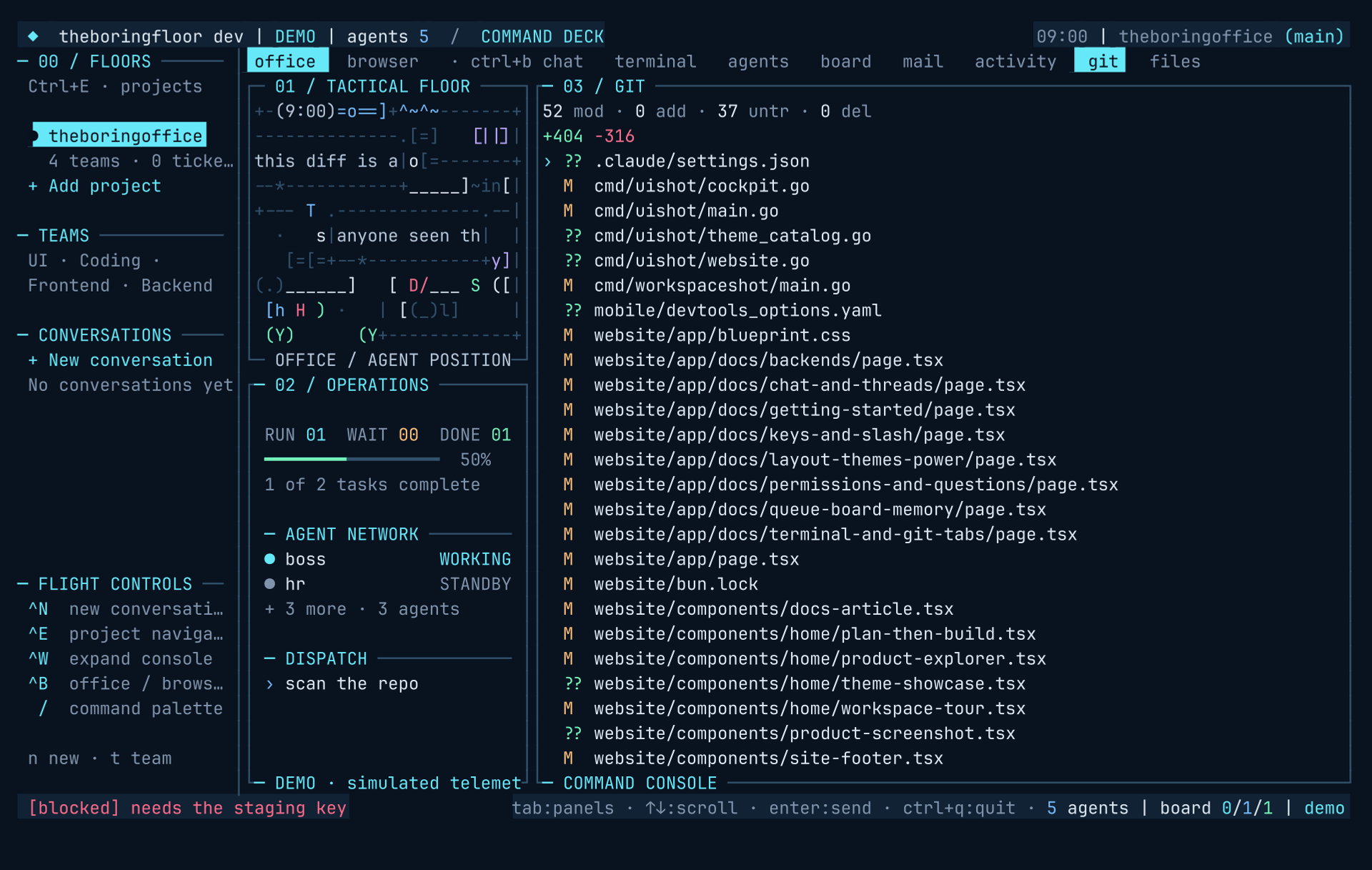
Two of the sidebar's eight tabs are not telemetry. The terminal tab is a PTY running your $SHELL; the git tab is a live repo cockpit with a colored diff viewer. Both behave the way the tools you already had do — the office just stopped making you leave for them.
A real PTY, spawned when you first look at it.
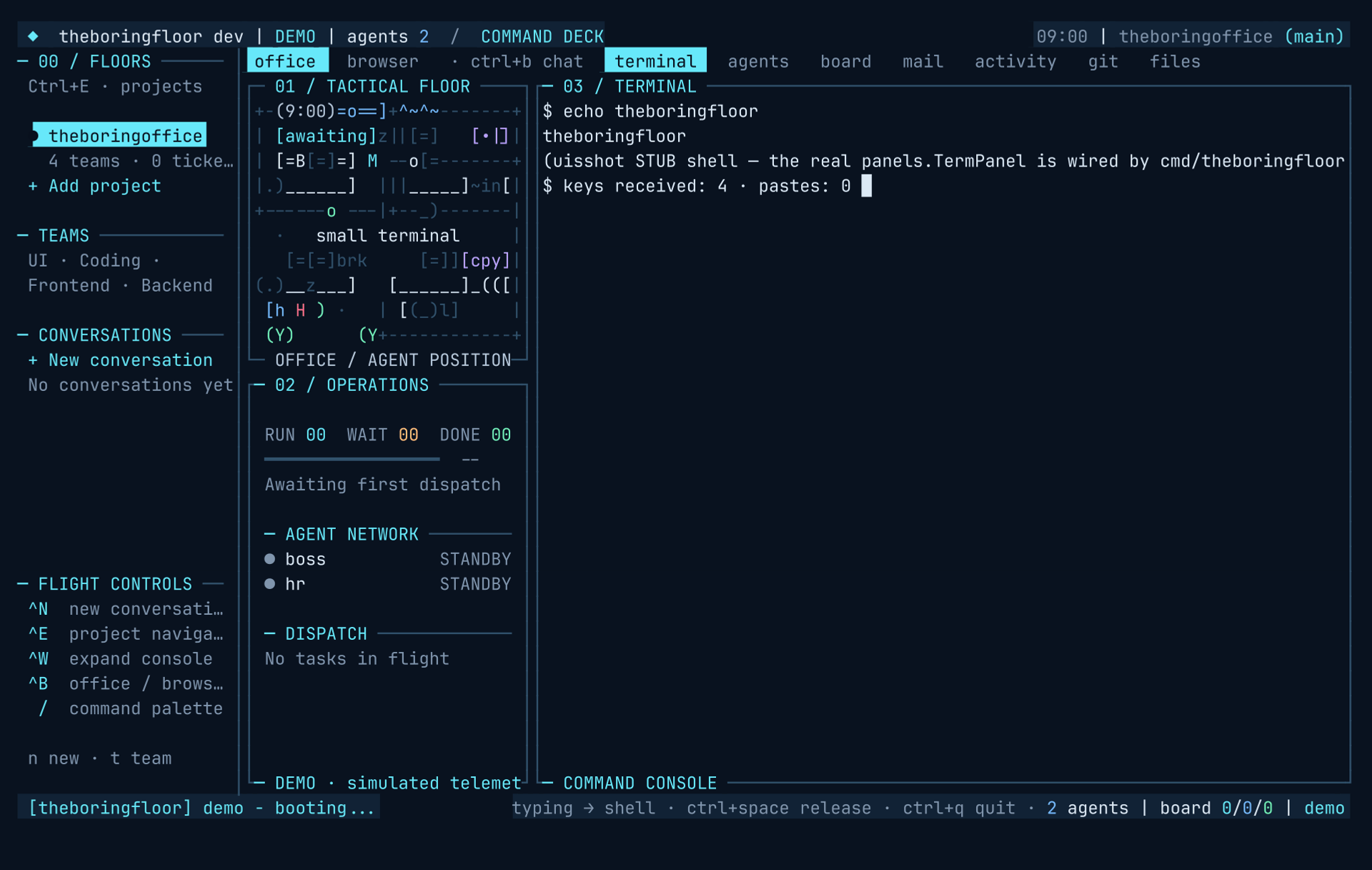
The terminal tab runs an OS shell ($SHELL) on a real PTY (creack/pty). It is lazily spawned on first visit — the office never pays for a shell you never open — it resizes with the panel, the mouse scrolls the scrollback, and when the shell dies r respawns it in place. A paste while the terminal is focused lands in the shell wrapped in bracketed-paste markers, so readline and zle treat the blob as a paste, not as typed commands.
One key decides who owns the keyboard.
By default the terminal does not grab the keyboard. Released is the default state: on the terminal tab the office keys keep working — tab, shift+tab, 1..8 and q still do office things. ctrl+space is the one capture toggle and it flips both ways: dive in and every key goes to the shell (tab completes, shift+tab sends the backtab sequence, digits type, q types, ctrl+c is SIGINT); the same key releases you back to the office keys in place.
Two guards keep it honest. ctrl+o also releases — an alias that can release but never dive — and leaving the tab auto-releases, so every visit starts released. The toggle itself cannot collide with your shell bindings: ctrl+space emits byte 0x00, a key of its own that nothing else shares. The status bar says which mode you are in — office keys · ctrl+space → shell released, typing → shell · ctrl+space release captured.
Drag, release, copied.
Drag over terminal text — the live screen or scrolled-up scrollback, captured or released — and the span highlights in reverse video. On release it copies to the system clipboard (pbcopy, wl-copy, xclip or xsel on PATH, plus OSC52 best-effort) and a dim · Copied N chars note rides the badge row. No follow-up keypress: the release is the copy. esc or typing cancels the highlight instead.
Shell-side mouse modes never fight this: the grid ignores the PTY's mouse-reporting requests and no mouse bytes reach the shell — selection stays yours, full-screen TUI apps keep their keyboard focus.
Live repo state, one glance wide.
The git tab reads the working tree the office sits on. A header summary carries the counts — modified, added, untracked, deleted, plus a +/- lines readout — above a scrollable file list with status glyphs: M modified, A added, ?? untracked, D deleted, R renamed; a * suffix means staged. A clean tree just says working tree clean.
enter or a click on a file opens its colored unified diff inline — + rows green, - rows red, hunk headers marked with @@. b or esc returns to the file list and r refreshes. Enough to review what a worker just wrote without spawning another pane.
What this doesn't do yet.
- One shell, one PTY. The terminal tab is not a multiplexer — splits and panes remain tmux's job, and the office is fine inside tmux.
- OSC52 is best-effort. Terminals that strip OSC52 quietly get nothing back; the badge still reports what the office sent.
- The git tab reads; it never writes. No staging, committing or conflict resolution — that is what the terminal tab two keys away is for.
- One file's diff at a time. The viewer is a review surface, not a three-way merge tool.